
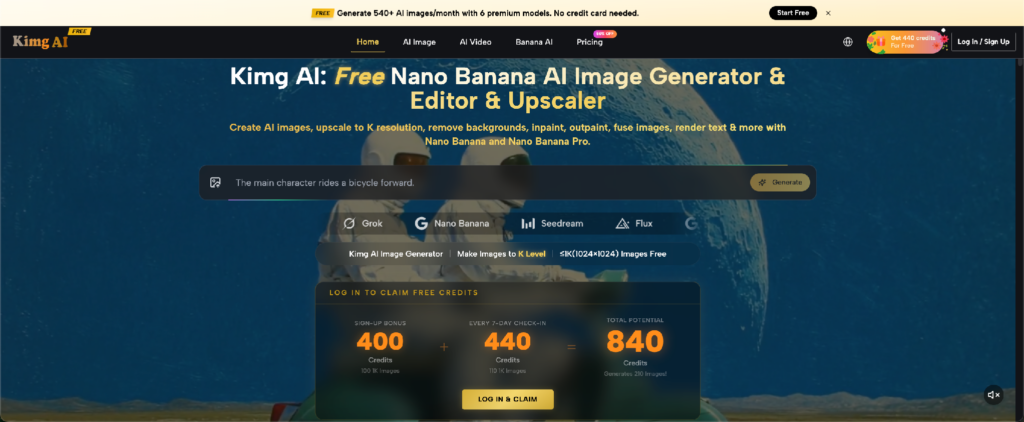
A familiar tech habit goes like this: a new AI image tool appears, the demo looks impressive, and people immediately wonder whether they should switch. Then they discover that their real problem was much smaller. They only needed to replace a background, preserve a product while changing its setting, or turn one approved still into a short clip. Kimg AI is one example of a platform that covers image generation, reference-based editing, and image-to-video work. But before opening any tool, it helps to identify the job first.
AI Image Tools Are Easier to Compare When You Ignore the Hype
Feature lists can make two tools look completely different even when they solve the same everyday problem. One page may emphasize models, another may emphasize resolution, and another may lead with creative examples. For a user, the practical question is simpler: what input do you have, and what output are you trying to get?
Suppose you already have a clean photo of a backpack. You do not need a system that invents a new backpack. You need one that can use your photo as a reference while changing the surrounding scene. If you have no starting image, text-to-image generation matters more. If you already approved a still and want motion, image-to-video becomes relevant.
That distinction reduces wasted testing because you compare tools by the task they must perform, not by how many impressive capabilities appear on the homepage.
Run the Five-Minute Input Test Before You Pick a Tool
Start with the material already on your device. The input usually tells you which route makes sense.
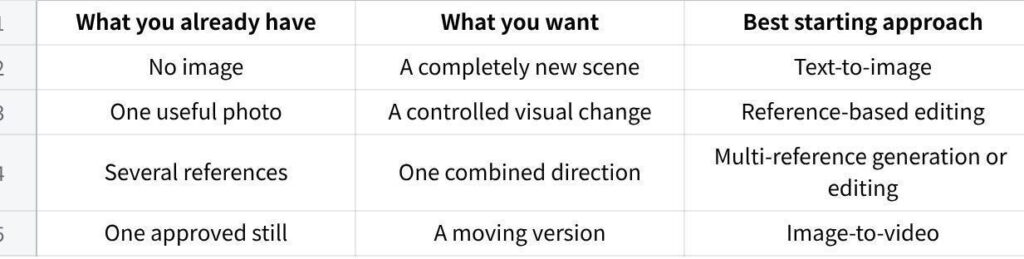
点击图片可查看完整电子表格
This sounds obvious, yet many poor results begin because the wrong starting mode was chosen. A user uploads a good product photo but describes the entire product again from scratch. Another user generates a new portrait when the real goal was to keep the same person and only replace the setting.
The five-minute test is simply a pause to identify your strongest existing input. Preserve what is already correct. Generate only what is missing. That rule makes both prompting and review easier.
Three Technical Checks Matter More Than a Long Feature List
Once you know the task, evaluate whether the tool gives you enough control over the parts that matter.
1. Can It Preserve a Reference Instead of Rebuilding Everything?
For editing, the important ability is not merely accepting an upload. The result should remain connected to the source. If a product, person, room, or illustration already contains useful details, your instruction should be able to identify what changes and what stays.
A practical test is to upload a familiar image and request one small change. If the background changes but the face, package, proportions, or camera angle drift unnecessarily, the workflow may be hard to control for factual content.
2. Can Multiple References Have Different Jobs?
Some tasks are difficult to explain with words alone. You may want the person from one photo, clothing from another, and the composition from a third. Nano Banana AI on the platform supports up to four reference images, making this kind of separated visual guidance possible.
The feature is most useful when you label each role in the instruction. Do not treat several uploads as a bag of inspiration. State which image controls identity, which controls clothing, which provides the setting, and which should influence framing. The tool still needs a clear map of your intent.
3. Can the Still Become Motion Without Starting Over?
Image-to-video matters when you have already solved the appearance of a scene. Starting again from text can reintroduce variation you had already removed.
A useful motion test begins with a simple action. Ask for steam to rise from a cup, a person to turn toward a window, or a light curtain to move in a breeze. If the goal is a short visual accent, one controlled action is easier to evaluate than a complex camera move combined with several moving objects.
Do a Small Stress Test With the Kind of Details You Actually Care About
A generic demo cannot tell you whether a tool fits your work. Use a test image that contains something difficult and relevant to you.
A reseller might choose packaging with small lettering. A creator who makes character scenes should test a face, hairstyle, and recognizable outfit across several versions. A local business could use a real product on a cluttered table and ask only for a cleaner environment. A designer might provide two references with deliberately different roles.
Then review the details that would make the final asset unusable. Did the label change? Did the person’s face drift? Did the product gain a new handle? Did the edit alter the camera angle even though you asked to keep it?
The point is not to find a flawless result on the first try. The point is to learn whether errors can be isolated and corrected without destroying the parts that already work.
Do Not Mistake the First Result for the Whole Workflow
One first-generation image is a poor basis for judging an editing tool. The more useful question is whether a promising result can be corrected without losing everything else. Try a second instruction that fixes one visible problem. If the product is right but the background is too busy, ask only for a simpler background. If the face is stable but the framing is wrong, change only the framing.
This reveals something a glossy demo cannot show: how predictable revision feels. A tool may produce an impressive first image yet become frustrating when every correction changes unrelated details. Another may start less dramatically but respond more consistently to focused edits.
For repeated work, that second behavior can matter more. Most real projects involve review, correction, and reuse. Test the revision loop, not just the first click.
Use a Stop Rule So Testing Does Not Become a Hobby
AI tools make experimentation unusually easy, which creates a new problem: users keep generating long after they have enough information to make a decision.
Set a stop rule before the test. For example: create one original scene, make one controlled edit, try one multi-reference task if you need it, and animate one approved still. Judge each result against a short list of criteria. If the platform consistently solves the jobs you actually have, more testing may not add much.
A stop rule is especially useful when several competing services look interesting. Without one, you can spend an evening comparing dramatic sample images that have little to do with your work.
Also separate “interesting” from “necessary.” A feature can be technically impressive and still have no place in your routine. The best tool is not automatically the one with the longest model list. It is the one that lets you complete your repeated tasks with understandable inputs and reviewable results.
Conclusion
New AI image tools will keep arriving, and their feature pages will keep getting longer. You do not need to test them all the same way. Start with the material you already have, identify whether the job is generation, controlled editing, multi-reference work, or motion, and then stress-test the details that matter to you. Keep the experiment small and define a stopping point before you begin. The next time a new tool catches your attention, spend five minutes defining the task before spending an hour comparing demos.